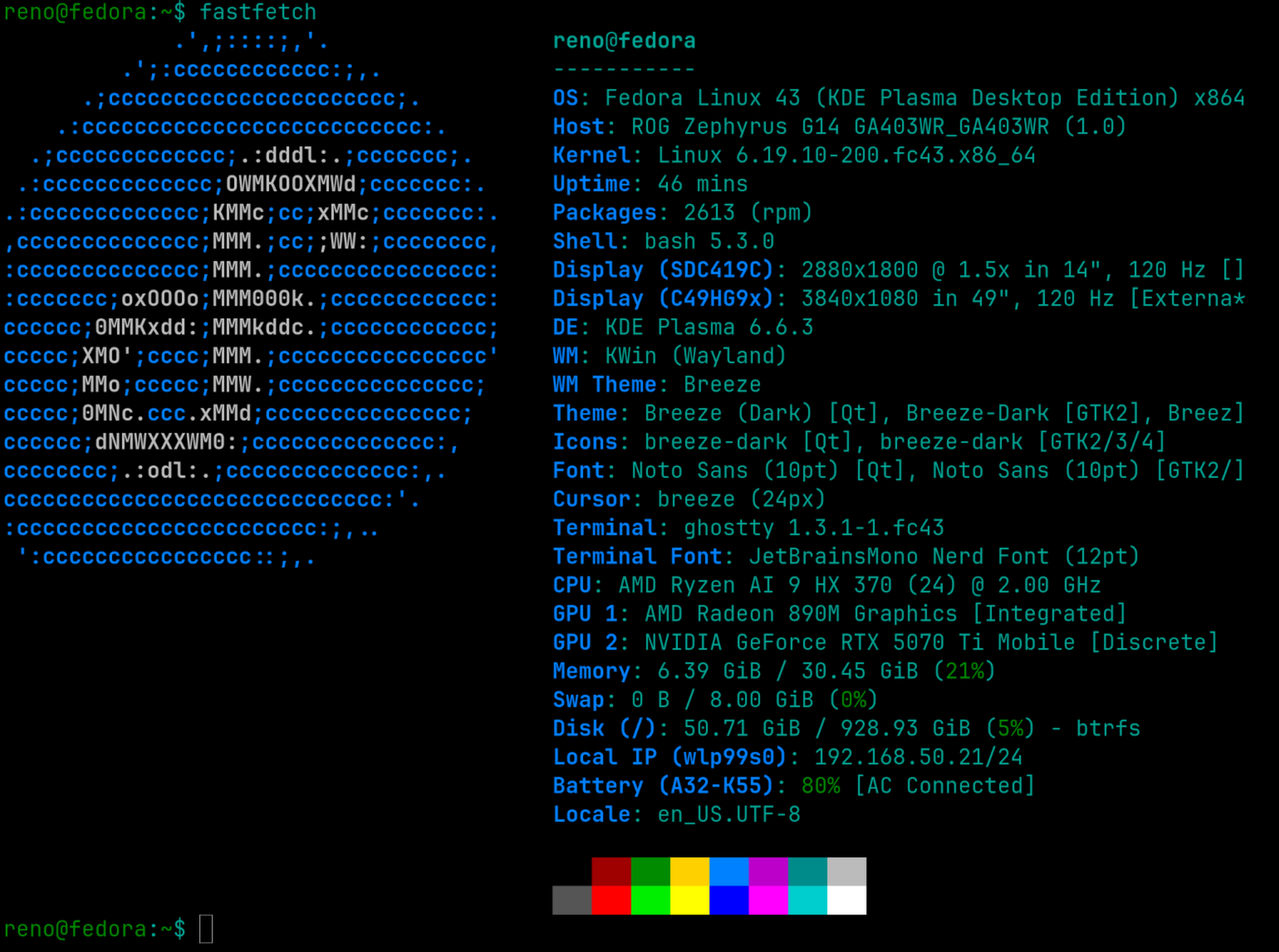
So, I decided to move to Linux… kinda. Really, I decided to move my laptop, an Asus ROG Zephyrus G14 (2025), to Fedora KDE. I wanted to write a post here on the setup process, how it went, and why I moved.
Resource HOGGG
The main reason for the move: Windows 11 AI crap. This laptop has an NPU in it, which is basically a chip for AI stuff, and with that, Microsoft decided to enable every AI feature under the sun, which, just after a fresh boot on idle, takes 44% of my RAM… 44% of 32GB.
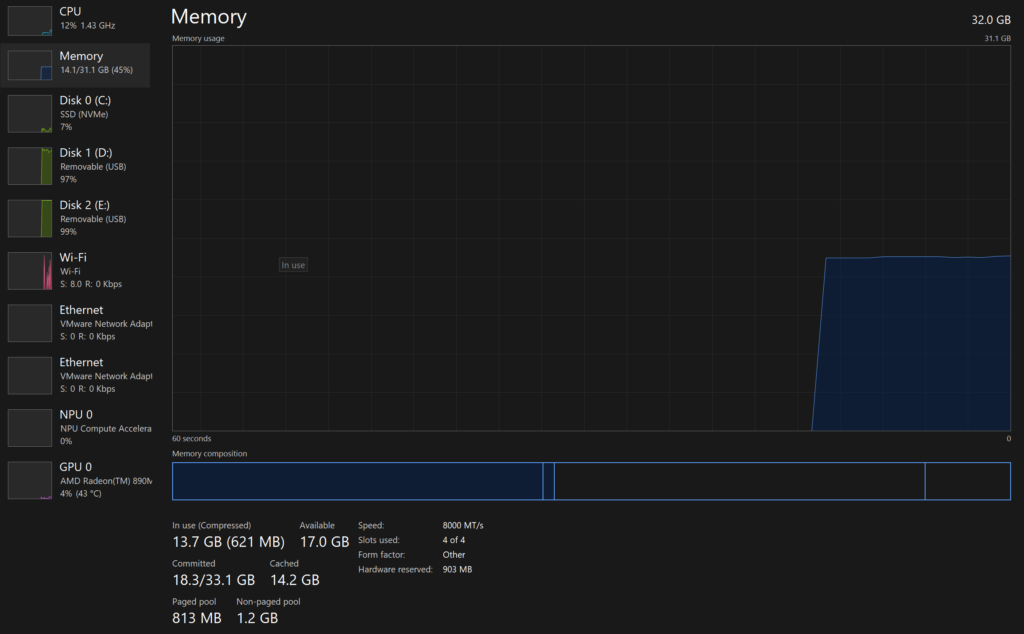
As you can see in this screenshot, that was right before I swapped the drive into this machine to install Fedora.
Temps
Another reason was temps. Now, I know this laptop, being a 14-inch form factor with all the hardware that it has, will never have amazing temps. But, Windows loved to run it up with basic things like this… writing this blog post with my laptop plugged into an external monitor on Windows, it would get toasty, even hot.
I use the Brave Browser too, so this is with ads already being blocked. Even then, on Windows 11, just using Brave to write a blog post would warm the laptop up. Here are the temps I have right now on Fedora 43:
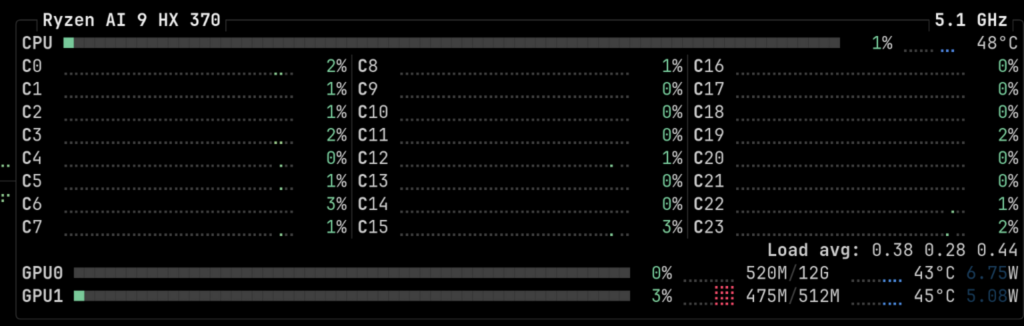
48 °C for the CPU and 45 °C for the GPU(Nvidia 5070-TI). A literal night and day difference, on Windows I would be at 65-70 °C by now.
My Data & Privacy
The last thing is the intrusive telemetry and constant pushes for me to give them my data. If you have installed Windows 11 recently, you know that they essentially force you to use an online account, push insanely hard for OneDrive, and every other Microsoft product under the sun.
I am tired of the constant ads 24/7 in an OS that already collects and sells my data. Now, with AI in the mix, I know they are probably training on my data, such as how I use my computer. That feels weird.
Those are the 3 main reasons I want to move away from Windows, at least on my laptop.
How has Fedora been?
Well, at this point, I am just about 24 hours into having Fedora installed on my laptop. Most of that time was spent on setup, which I will go over next.
I will say, for someone who just uses Windows to game and browse the web, at least on this laptop, you may not want to put in all the work required. But, even with that, I am happy with it so far.
One odd thing, though, in KDE, the mouse pointer speed can only go to 1.00 in the UI, and to set it above that, you need to type “kwriteconfig6 –file kcminputrc –group Mouse –key XLbInptAccelSpeed 3.0” in the terminal. I guess none of the KDE devs use a 3.0 speed like me, haha.
Other than that oddity, it has been fun, doing all the tweaks, installing my programs, getting used to the new KDE, etc. I haven’t had huge driver issues or like my screen going black because of my Nvidia GPU. It just worked.
The Setup
So, along with the regular Fedora 43 install, I had to do a few things to get everything right for my specific laptop. I will lay out the resources I used here, along with some info, so if anyone else has the same machine, you can get going right away!
RPMFusion:
First I set up RPMFusion after doing my first “dnf update” – https://rpmfusion.org/.
This will allow you to install extra software that does not come with Fedora by default, which is needed for setting up all the nice Asus-related packages!
Asus-Linux:
Then, I followed the Fedora guide on the Asus-Linux website to get the proper drivers, and the ROG Control Center program so I can tweak my keyboard lighting, fan curves, manage the dedicated GPU, etc – https://asus-linux.org/guides/fedora-guide/.
I mainly just followed the “Install Nvidia Graphics Drivers” and “Install asusctl and supergfxctl” sections.
Another thing with this, after you set it up, if you want to disable the LED on the back of the laptop lid, run this in the terminal: “asusctl slash –disable”.
YouTube resources:
Lastly, I picked a few things from some YouTube videos that I watched to help fine-tune my setup a bit and get some tips:
This first video has some good tips for installing Codecs that are not available in Fedora by default for playing certain media like .MOV files.
This next video introduced me to RPMFusion and goes over using Fedora on this specific laptop and how the process went, setting it up.
This video is a kind of extra resource I thought some people may be interested in. It goes over an AppImage manager for programs that use AppImage instead of installing with dnf.
I use this for Root ATM since they only have an AppImage available. Also, I do have a Root and Discord server linked in my link.tree!
Conclusion
Overall, I am happy with the move. Everything feels new, snappy, and I don’t have the looming sense of someone watching over my shoulder 24/7 *cough* Microslop.
I wanted to write this quick post here to share my rough thoughts on the experience in the big 2-6 and share how it went. I plan to keep using this setup for the foreseeable future since I do have a Windows desktop I can fall back on if I really need it.
Well, I will see how this goes over the next couple of months or so as I settle in and get used to the ecosystem. Thanks for reading, be on the lookout for an update in the future!


Leave a Reply